Microsoft Defender, like many other EDRs and AVs, is an attractive target for vulnerability research because it runs with the highest privileges and includes many kernel-level components. Another key property that expands its attack surface is that it’s multi-platform: it runs on Windows, macOS, and Linux, which each have their own set of operating system APIs and security controls.
In early 2026, two local privilege escalations in Microsoft Defender for Windows were publicly disclosed and exploited in the wild. CVE-2026-33825 (“BlueHammer”) exploited a race condition, while CVE-2026-41091 exploited missing symlink validation in Defender’s detection and remediation flows. While those vulnerabilities were patched, I took a closer look at their root causes and found that while they may have been fixed for Windows, subtle differences in how security and filesystem APIs work in macOS allowed variants of these vulnerabilities to still be exploited.
Microsoft has since patched both, assigning CVE-2026-50657 (arbitrary file read / information disclosure) and CVE-2026-50658 (TOCTOU race condition / elevation of privilege). I presented this research at BlueHat Asia 2026 and this post is the long-form writeup.
While the vulnerabilities themselves are fairly straightforward once you have the initial primitives, I thought this was a good opportunity to dive into macOS-specific security mechanisms and the differences between them and their Windows equivalents. Cross-platform variant analysis is often overlooked but can reveal significant regressions where a vulnerability may be patched in one OS but is still exploitable in another.
macOS IPC Security Mechanisms 🔗
The vulnerabilities here are unique to macOS, both because Defender for macOS is architected differently from Defender for Windows and because the operating system itself handles identity, authorization, and linking differently.
Privileged inter-process communication (IPC) is full of footguns. The pattern is always the same: an unprivileged user application sends a request across some channel to a privileged listener, which performs a privileged action on its behalf. Things go wrong when there is a missing or broken authentication/authorization check at the listener, insufficient validation of inputs for the privileged action, or incorrect configuration of the OS authorization APIs. I’ve written about exactly this shape of bug before in Zscaler Client Connector (CVE-2023-41973). Operating systems ship mechanisms to help developers avoid these footguns so it’s worth understanding what macOS offers on this front.
Code signing, Developer ID, and notarisation 🔗
Every executable macOS runs is code-signed. Third-party software distributed outside the App Store is signed with a Developer ID certificate issued by Apple to a developer Team ID (Microsoft’s is UBF8T346G9) and is typically notarised.
The Code Signing Services API (SecStaticCodeCreateWithPath, SecCodeCopyGuestWithAttributes, SecStaticCodeCheckValidity) lets userland programs verify that another file or running process satisfies a code-signing requirement using a small predicate language. For example, anchor apple (signed by Apple), anchor apple generic (chains to an Apple root, including Developer ID), or identifier "com.microsoft.wdav" and certificate leaf[subject.OU] = "UBF8T346G9". This is analogous to Windows’ WinVerifyTrust API and Authenticode policy.
Code signing is why a privileged macOS daemon can verify whether an IPC peer is really a vendor’s signed binary. It is also why, as we’ll see, getting that question wrong is fatal.
System Integrity Protection and the Hardened Runtime 🔗
System Integrity Protection (SIP) is an on-by-default, kernel-enforced mandatory access control: it forbids modifying protected locations and attaching to or injecting into protected processes. SIP is the reason an attacker cannot simply inject into one of Defender’s signed helper processes to borrow its identity for IPC. With SIP on, task_for_pid (process injection) against an Apple-signed or hardened binary fails, and DYLD_* injection (the rough equivalent of DLL injection on Windows) is blocked. So to impersonate a trusted process for IPC, an exploit has to find some other flaw in the target.
Authorization Services 🔗
Defender’s IPC builds on macOS Authorization Services to perform privileged actions. Because this API is widely misunderstood, it’s worth being precise about what it’s for.
A program acquires an AuthorizationRef, then calls:
OSStatus AuthorizationCopyRights(AuthorizationRef authorization,
                                 const AuthorizationRights *rights,
                                 const AuthorizationEnvironment *environment,
                                 AuthorizationFlags flags,
                                 AuthorizationRights **authorizedRights);
naming one or more rights using string keys such as com.microsoft.mdatp.controllogging. The call consults the system authorization policy database, which maps each right to a rule. Built-in rules include allow, deny, is-root, authenticate-admin, and authenticate-session-owner. If the rule is satisfied, the call returns errAuthorizationSuccess. Csaba Fitzl (theevilbit) has an in-depth breakdown of macOS authorization.
On the build I analysed, Defender registers thirteen custom rights in the policy database. Reading a live rule shows what it requires. For example:
security authorizationdb read com.microsoft.mdatp.readlogs
returns a rule whose rule array is is-root or authenticate-admin-30. In other words, the right is granted if the authorization’s owning process is already root, or if any administrator authenticates (with a 30-second credential cache) at a pop-up dialog box.
The crucial thing is that this feature is opt-in, or “self-restricted”, in Apple’s own terminology. The protection AuthorizationCopyRights offers is meaningful only as long as the code chooses to call it and to act on the result. It is not an enforcement boundary that the operating system maintains.
Peer identity and audit tokens 🔗
macOS offers several IPC mechanisms: Mach messages, XPC and NSXPC (the modern, recommended abstractions), and classic BSD sockets including AF_UNIX. Defender’s wdavdaemon uses AF_UNIX stream sockets.
The central question for any privileged listener is peer identity: which process is on the other end, and may it do this? Getting it wrong is often the precursor to an LPE. A program can answer it a few ways on macOS:
getsockopt(client, SOL_LOCAL, LOCAL_PEERPID, …)retrieves the process ID (pid) of the peer atconnect()time. XNU (the macOS kernel) records it once and never updates it.proc_pidpath(pid, …)retrieves the current absolute filesystem path of the executable for a pid. It answers “what image is pid N running right now?” and that value changes if the process re-execs withexecve().getsockopt(client, SOL_LOCAL, LOCAL_PEERTOKEN, …), orxpc_connection_get_audit_tokenfor XPC, retrieves the peer’s audit token, an opaque struct carrying, among other fields, thepidand apidversiongeneration counter that is bumped on eachexecve. The audit token also carries thesigning_idused to look up entitlements. It is the only peer credential that is both bound to a specific process and invalidated when that process re-execs. (Scott Knight has a good writeup of audit tokens.)
A common vulnerable pattern is to rely on only the first two: fetch the peer’s pid, then check the executable path for that pid against an allowlist. That creates a race window between the moment the pid is captured and the moment the path is checked. This “PID reuse” technique was presented by Samuel Groß (5aelo) in his Don’t Trust the PID! WarCon 2018 talk.
Defender’s Attack Surface 🔗
Process model 🔗
On a running install of Defender for macOS, the relevant processes are:
| Process | Privilege | Role |
|---|---|---|
wdavdaemon |
root | The privileged broker. Owns the two IPC sockets, the engine, quarantine, and diagnostics. |
wdavdaemon_enterprise |
root | EDR worker (enterprise features). |
wdavdaemon_unprivileged |
_mdatp |
Scanning worker; communicates with the root daemon. |
Microsoft Defender Helper |
user | GUI/tray helper. |
The root-privilege wdavdaemon is signed by Microsoft (Team ID UBF8T346G9) and runs as a LaunchDaemon.
IPC sockets 🔗
wdavdaemon exposes two AF_UNIX stream sockets:
/var/run/wdavdaemon.sock: the public socket./var/run/priv_wdavdaemon.sock: the private socket.
Both are created mode 0666 (srw-rw-rw-), owned by root, so any local process may connect to them. The “private” socket is private in intent only: it handles the more sensitive opcodes (threat handling, configuration) but is just as reachable.
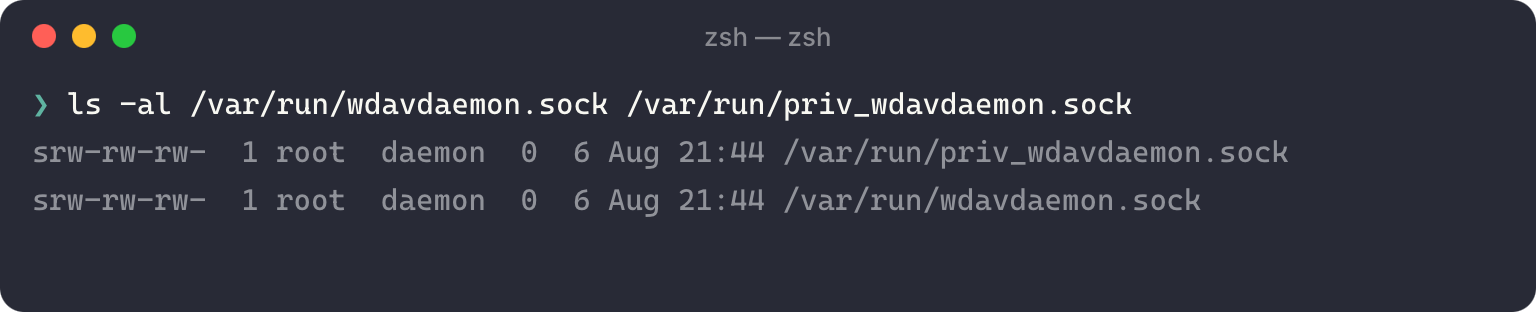
Both sockets share a packet structure over SOCK_STREAM:
frame_header (16 bytes, big-endian)
  u32  seq            ; sequence, echoed in the reply
  u8   reserved[8]    ; always zero
  u32  body_len       ; length of body that follows
body (body_len bytes)
  u32  opcode  (little-endian)
  ...  payload        ; opcode-specific
The two opcodes that matter for this writeup:
| Opcode | Name | Action |
|---|---|---|
0x05 |
handle_threat |
quarantine/restore a file |
0x0f |
get_diagnostic_files |
produces a world-readable ZIP |
Most privileged opcodes converge on a single call to AuthorizationCopyRights (re-checking a com.microsoft.mdatp.* right) inside libwdavdaemon_core.dylib. Without a valid 32-byte AuthorizationExternalForm structure in the body payload, a gated opcode returns a uniform “auth-failed” reply and the handler never runs. That’s a reasonable consent gate but it only establishes that an administrator consented, not that the caller is the genuine Defender client. Caller identity is delegated entirely to the separate per-connection peer check.
Peer validation 🔗
Before any handler runs, the daemon validates the connecting peer:
getsockopt(SOL_LOCAL, LOCAL_PEERPID)to retrieve the peer’s connect-time pid.proc_pidpath(pid, …)to retrieve that pid’s current executable path.- A strict prefix match of that path against a runtime-built allowlist starting with
"/Applications/Microsoft Defender.app". The match enforces directory boundaries, so/Applications/Microsoft Defender.appEVILdoes not pass. - On a path match, a Code Signing Services requirement check (
anchor apple/anchor apple generic). For non-bundle peers this is never reached, because the prefix check rejects first. - On failure,
shutdown(SHUT_RDWR)+close(). From the client this looks like an EOF mid-handshake.
For an ordinary uid-501 process, step 3 rejects unconditionally. But notice that steps 1 and 2 use two different representations of the peer: a frozen pid and a live path. This is vulnerable to a PID-reuse race.
Peer Validation Bypass 🔗
The race is straightforward to exploit:
LOCAL_PEERPIDis captured when the peer connects, and is immutable thereafter.proc_pidpathreturns the pid’s current executable path, which we can change withexecve().
Strictly, the PID-reuse variant I use here isn’t a recycled pid number landing on a different process but the same process re-execve-ing to change the path its pid resolves to, which is a member of the same pid-trust family.
The critical fact about execve is that the kernel updates the process’s recorded image path before it returns to userland and before the new image’s first instruction runs. The exec’d binary need not be functional, need not perform any IPC, and need not even survive. It only has to have caused the pid path update by the time the daemon calls proc_pidpath.
So the exploit forks many child processes, each racing like this:
s = socket(AF_UNIX, SOCK_STREAM)connect("/var/run/wdavdaemon.sock"):LOCAL_PEERPIDis now frozen to the child’s pid.send([16B header][u32 LE 0x0f]): the request is queued.execve("/Applications/Microsoft Defender.app/Contents/MacOS/wdavdaemon_unprivileged.app/Contents/MacOS/wdavdaemon_unprivileged", argv=["wdavdaemon"], …): the kernel updates the pid path to an allowlisted, Microsoft-signed binary (which then immediately dies on its singleton check, but that’s fine).
Meanwhile the daemon, after accept():
getsockopt(LOCAL_PEERPID, &pid): pid is the child’s pid.proc_pidpath(pid, path): whatever path is recorded now.prefix-match(path, "/Applications/Microsoft Defender.app").- Match → run the handler; no match →
shutdown(fd).
If the daemon’s step 2 runs after the child’s step 4, proc_pidpath returns the bundle path and the check passes, even though the process that actually connected was the attacker’s own program (a Perl script, in my PoC). By the time the daemon reads the path, that child has re-exec’d into the allowlisted, Microsoft-signed binary, which is what satisfies both the prefix match and the code-signing check. The attacker-controlled child can now make arbitrary IPC calls to wdavdaemon.
Local Privilege Escalation 🔗
With the peer check beaten, we can invoke any opcode on either socket and turn Defender’s own privileged handlers into exploit primitives. Two opcodes can achieve this: 0x0f get_diagnostic_files gives an arbitrary file read as root, and 0x05 handle_threat::restore gives an arbitrary file write as root.
Arbitrary File Read (CVE-2026-50657) 🔗
An ungated opcode 🔗
Unlike the more privileged opcodes, 0x0f get_diagnostic_files does not funnel through the AuthorizationCopyRights gate at all. Sending a body of just [u32 LE 0x0f], with no authorization blob, returns a fully-formed reply:
result<optional<boost::filesystem::path>>  OK
path = "/Library/Application Support/Microsoft/Defender/wdavdiag/<UUID>.zip"
Each call makes the root daemon build a fresh diagnostic archive at a UUID-named path under /Library/Application Support/Microsoft/Defender/wdavdiag/, in a directory that is world-readable and searchable (0755 root:wheel).
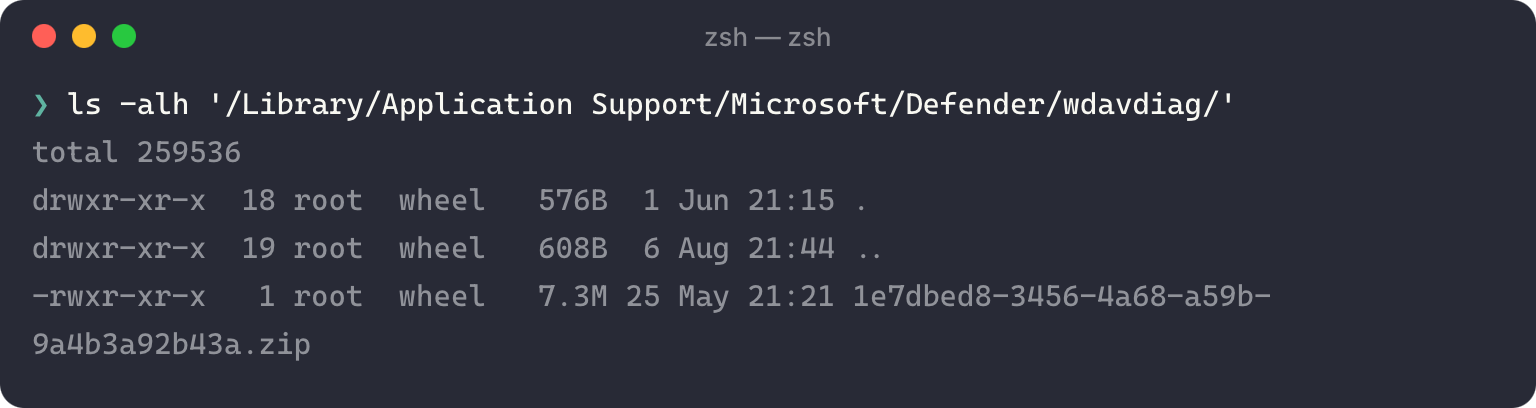
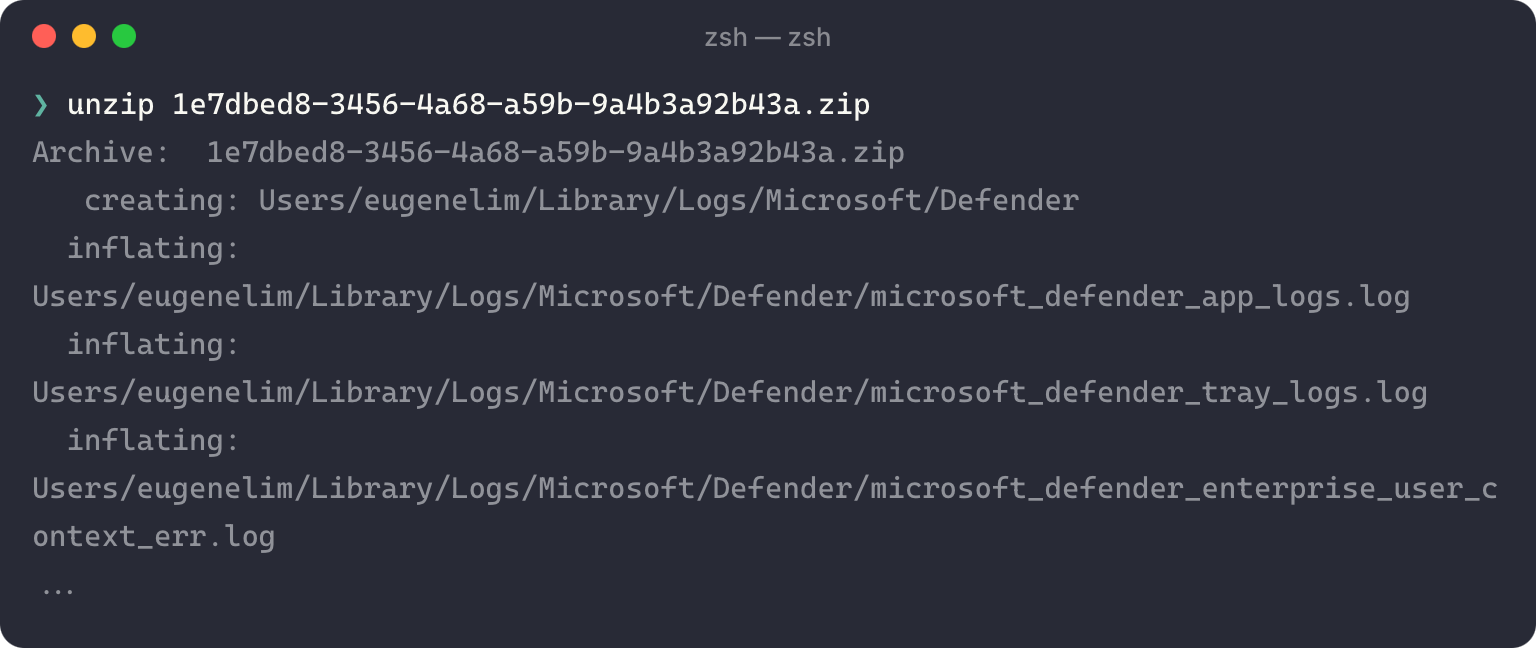
Inspecting a produced ZIP shows the archiver collects, among other things, all regular files under $HOME/Library/Logs/Microsoft/Defender/. This is the user’s own log directory that’s created automatically on first launch. The archiver opens each file with the daemon’s normal open routine. The daemon is root, so open(O_RDONLY) succeeds on whatever the path resolves to.
Redirecting with a hardlink 🔗
$HOME/Library/Logs/Microsoft/Defender/ is owned by the user (uid 501, 0755), so the user can create directory entries in it, including hardlinks. The subtlety that makes this an arbitrary read is a property of POSIX link(2): it does not require read access to the source file. It only requires the source path components be searchable and the destination directory be writable by the caller.
So, as uid 501:
link("/etc/kcpassword",
     "/Users/eugenelim/Library/Logs/Microsoft/Defender/microsoft_defender_app_logs.log");
is legal even though the target is root-only. The planted directory entry now points at the root-owned inode while sitting inside a user-owned directory.
Why a hardlink and not a symlink? As the archiver walks the directory, it checks each entry and archives only regular files using the boost filesystem library function boost::filesystem::status() which returns a file_status with a file_type enum member. The rejected types are directory_file, symlink_file, block_file, character_file, fifo_file, socket_file, reparse_file, and type_unknown, so a planted symlink is filtered out and never reaches the open().
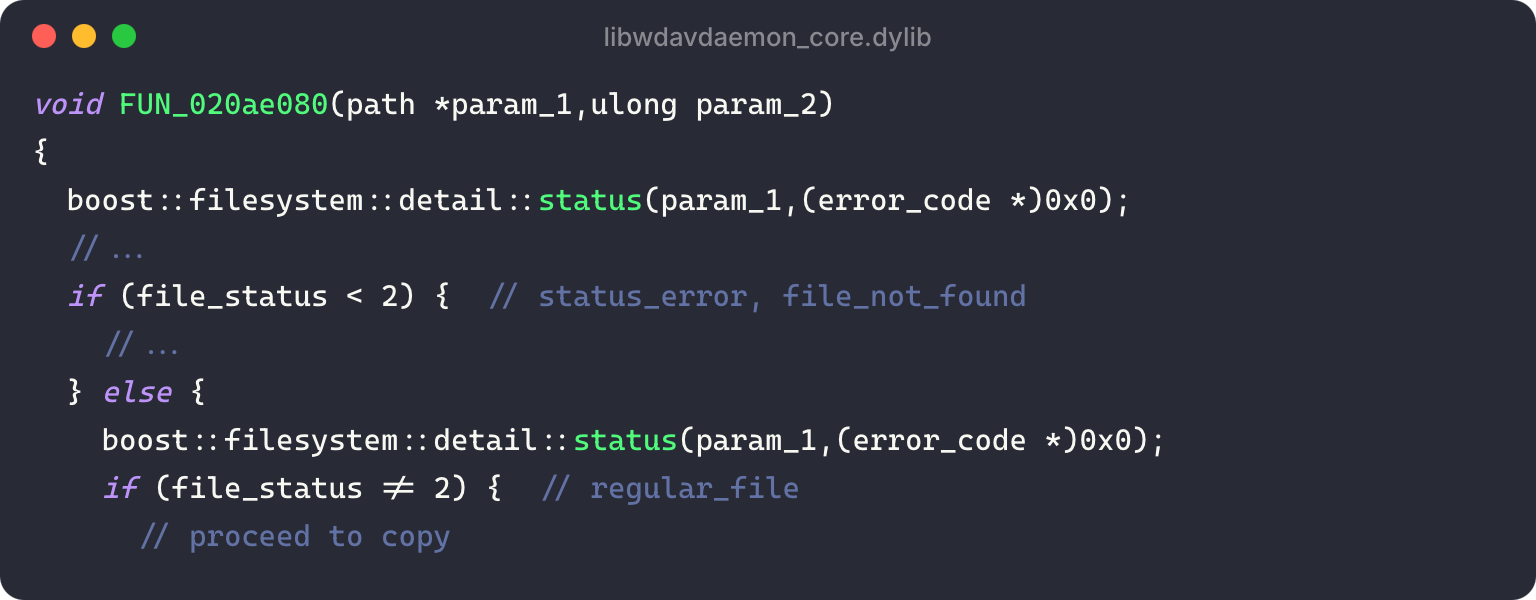
A hardlink, on the other hand, is not a distinct file type: it reports as an ordinary regular file (S_IFREG, uid=0) and passes the regular-file filter. The daemon, as root, opens the inode and streams its bytes into the world-readable ZIP, which the user then reads.
This is the macOS analogue of CVE-2026-41091, but a symlink-only fix would not have stopped it. Unlike a Windows hardlink, which has required FILE_WRITE_ATTRIBUTES access to the target since 2015, as James Forshaw documented in Between a Rock and a Hard Link, a macOS hardlink needs no access to the target at all. This is a critical difference in security assumptions between macOS and Windows.
With a file read as root, escalating further is straightforward. Juicy targets include /var/db/dslocal/nodes/Default/users/*.plist (the ShadowHashData local-account password hashes, macOS’s equivalent of the SAM), /etc/kcpassword (the XOR-obfuscated autologin password), TCC.db, other users’ ~/Library secrets, SSH keys, and browser cookie jars.
Arbitrary File Write (CVE-2026-50658) 🔗
The second vulnerability targets the private socket and the handle_threat::restore action (opcode 0x05, sub-action restore), which lets an authorized admin release a quarantined file to a chosen destination.
The optional that skips authorization 🔗
The restore request encodes its AuthorizationExternalForm as a std::optional<array<u8,32>>. This is a presence byte followed, only if present, by the length and bytes:
body (opcode 0x05 restore):
  u32 LE opcode      = 5
  u32 LE pad         = 0
  u64 LE tid_len     + threat_id            ; ASCII UUID, 36 bytes
  u32 LE sub_action  = 1                     ; restore
  u8  has_dest_path  = 1
  u64 LE dest_len    + dest_path             ; daemon writes here, as root
  u8  has_auth_blob  = 0   <-- THE BYPASS    ; no bytes follow
When has_auth_blob = 0, the deserialiser reads an absent optional and the handler skips authorization entirely. It never calls AuthorizationCreateFromExternalForm or AuthorizationCopyRights.
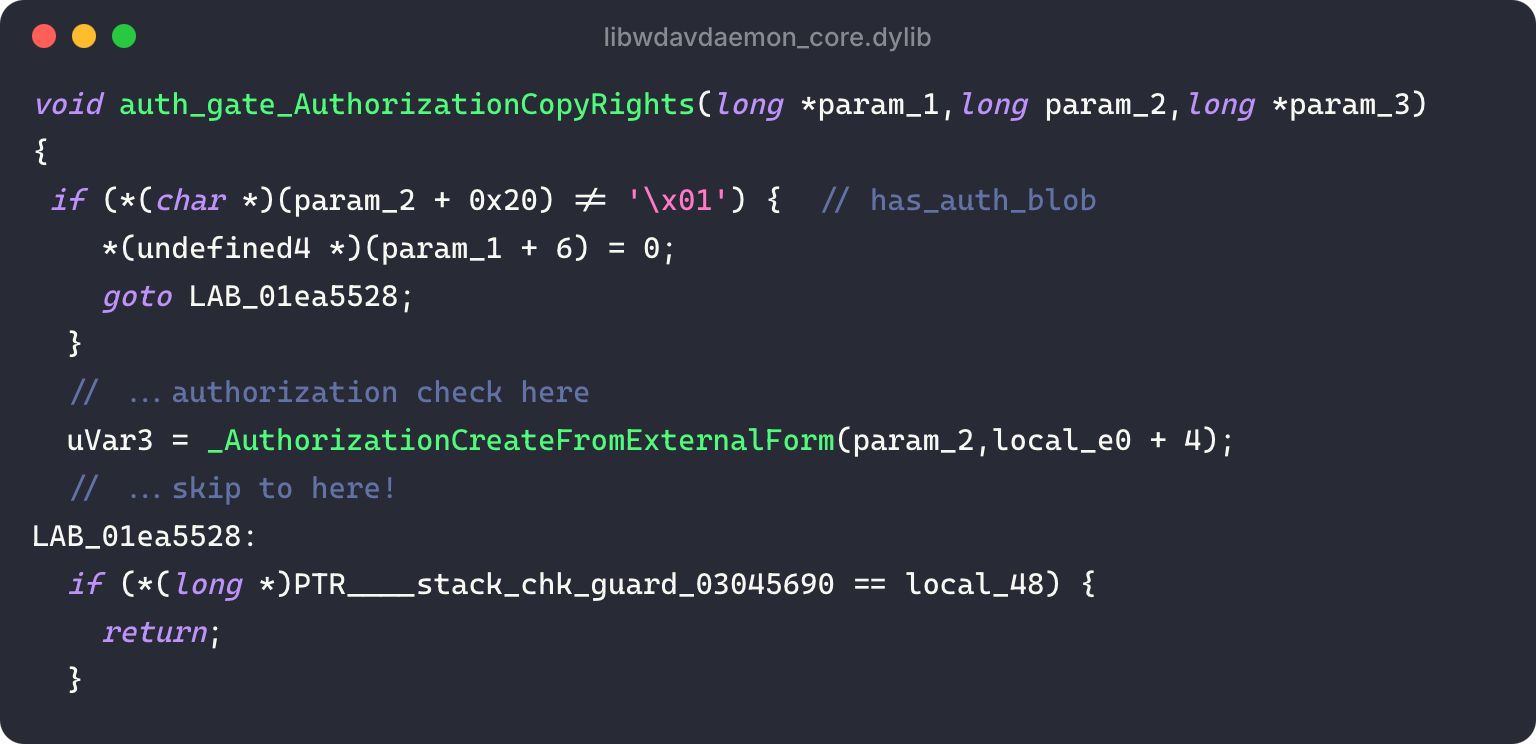
This is a distinct code path from providing an invalid authorization blob: a 32-byte all-zero blob (has_auth_blob = 1, content zero) is correctly rejected at AuthorizationCreateFromExternalForm. It’s specifically the absent optional that falls through.
The only remaining gate is the private socket’s peer validation, which is the same getsockopt(LOCAL_PEERPID) → proc_pidpath → SecStaticCodeCreateWithPath pattern and therefore vulnerable to the same PID-reuse race. So a non-root user can restore any quarantined file to an arbitrary destination.
Staging the quarantined file 🔗
The restore handler restores a previously quarantined file, so the attacker first lets Defender quarantine attacker-controlled bytes: write an EICAR string to /tmp/<name>, and real-time protection quarantines it, preserving the original basename in the quarantine metadata.
The quarantined files land in /Library/Application Support/Microsoft/Defender/quarantine/ as user-owned files, and their contents are simply XOR(0x25)-encoded. That makes it trivial to swap the quarantined EICAR for arbitrary content and stage it for restore. The exploit then triggers restore with a controlled dest_path, and Defender decodes and writes the attacker-controlled content to <DEST_PATH>/<ORIGINAL_BASE_NAME>. This is effectively an arbitrary file write as root.
There is one important caveat: the restore flow can only write to paths that do not exist yet.
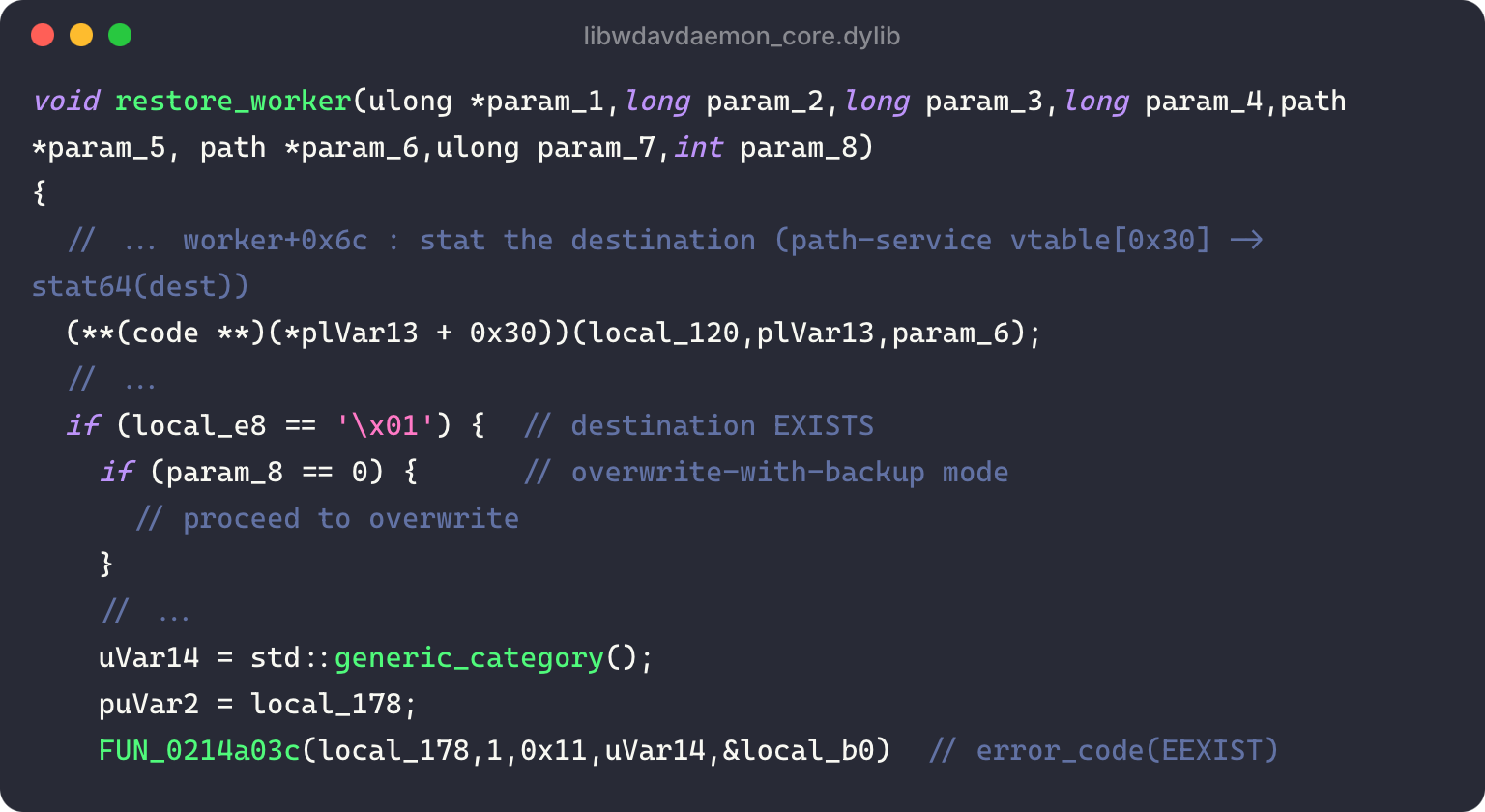
The handler stats the destination; if it exists, an overwrite-with-backup mode is possible in principle, but for the restore sub-action the relevant flag is hard-coded to the no-clobber path, which refuses with EEXIST. So we have an arbitrary file create primitive, not an overwrite.
Command Execution 🔗
This part is a little embarrassing, but the create-only constraint stumped me for a while as most of the vectors I knew of escalating file write to code execution relied on overwriting or appending to existing files. It took three attempts.
Attempt 1: LaunchDaemons 🔗
LaunchDaemons (in /Library/LaunchDaemons/) are the macOS analogue of Windows Scheduled Tasks or Services, and dropping one doesn’t require overwriting anything, so it looks like a clean fit. However, root-privilege LaunchDaemon scripts must be owned by root, and the restore process restores the original owner with chown:
1. open(<dest>/<basename>.tmp, O_CREAT|O_EXCL)        ; created as root
2. write(decoded original bytes)
3. rename(<dest>/<basename>.tmp, <dest>/<basename>)
4. chown(<dest>/<basename>, source_uid, source_gid)   ; BY PATH, not fchown
Step 4 chowns by path, not by the open fd. Between steps 3 and 4 the final file exists and is root-owned, so if <dest> is a symlink whose target is swapped during that window, step 4’s chown lands on a different file (a decoy) and the real destination keeps root ownership. It’s a much tighter race than the PID-reuse one, but theoretically winnable.
Unfortunately, an unprivileged user can’t launchctl bootstrap a system-domain plist, so even a perfectly root-owned LaunchDaemon has no trigger the attacker controls until the system is rebooted.
Attempt 2: Defender’s own install-monitor LaunchDaemons 🔗
If I can’t bootstrap a LaunchDaemon myself, maybe Defender will. The product ships install-monitor LaunchDaemons for its tracer and DLP subsystems that run a root script when a watched file appears under /Library/Application Support/Microsoft/{DLP, Defender/dlp_processor, Defender/tracer}/install/. That script (install_helper) copies a daemon plist into /Library/LaunchDaemons/ and bootstraps it:
cp  "<app-bundle>/.../com.microsoft.wdav.tracedaemon.plist"  /Library/LaunchDaemons/
launchctl bootstrap system  /Library/LaunchDaemons/com.microsoft.wdav.tracedaemon.plist
At first glance this is a deterministic, no-reboot path. But it fails for the same reason: the write primitive can only create. The cp source is a pre-existing, root-owned plist inside the app bundle, which the restore handler refuses to overwrite, so the script always ships Defender’s own plist rather than mine. Planting a file at the cp destination fails from the other side, because the root cp overwrites it before the bootstrap; and I can’t lock the destination either, since making a file immutable requires owning it, while launchd requires the plist to be root-owned. Every variation of this route depends on rewriting a file that already exists, which is exactly what the primitive can’t do.
Attempt 3: Keeping it simple with cron 🔗
macOS still ships a lot of legacy Unix artefacts, and one of them is cron.
cron on macOS is itself a launchd job, com.vix.cron, and on a stock install it’s deprecated, but dormant. There is no /etc/crontab, and the job’s KeepAlive is a PathState condition watching that exact path:
<key>KeepAlive</key>
<dict>
    <key>PathState</key>
    <dict>
        <key>/etc/crontab</key>
        <true/>
    </dict>
</dict>
Creating /etc/crontab therefore starts cron immediately, with no reboot. Because the file is normally absent, this is a create, not an overwrite, perfect for the write primitive. Ironically, by deprecating cron, macOS made this a perfect candidate for the chain.
Better yet, it sidesteps the ownership problem that killed the LaunchDaemon route. A LaunchDaemon must be root-owned or launchd rejects it, which is what forced the chown-TOCTOU race above. cron enforces no such rule on /etc/crontab: it reads the file and runs each line’s command as the user named in that line’s sixth field. A line beginning * * * * * root … runs as root even when the file itself is owned by uid 501.
The payload is a single system-crontab line:
* * * * * root /bin/sh -c 'cp /bin/zsh /tmp/lpe_root_shell; chown root:wheel /tmp/lpe_root_shell; chmod 4755 /tmp/lpe_root_shell'
That completes the end-to-end escalation: stage an EICAR file named crontab, replace its quarantine blob with the line above, and run the auth-skip restore with dest = /etc. The peer race lands /etc/crontab (uid 501, 0644); launchd starts cron; and /tmp/lpe_root_shell -p triggers an interactive root shell within about a minute of the write. With only the single peer race to win, it’s a lot more reliable.
Conclusion 🔗
Both bugs were reported to the Microsoft Security Response Center (MSRC) and fixed on the July 2026 Patch Tuesday:
| CVE-2026-50657 | CVE-2026-50658 | |
|---|---|---|
| Class | Exposure of private personal information to an unauthorized actor | TOCTOU race condition |
| Impact | Local information disclosure (arbitrary file read) | Local elevation of privilege (arbitrary file write → root) |
The macOS LPEs were found independently of the Windows ones, but it’s no coincidence that they mirror the 2026 Windows Defender escalations. What’s interesting is how the same two bug classes are handled differently by macOS’s IPC and security primitives.
| Windows | macOS | |
|---|---|---|
| Process identity | Relies on process handles; the kernel locks process objects in memory. | Must explicitly check the audit token to mitigate PID reuse. |
| Authorization | Kernel-evaluated access tokens and integrity levels against the target’s ACLs. | “Self-restricted” (opt-in) use of the Authorization Services APIs. |
Due to these differences, the exploit also works differently on macOS:
- Identity. Windows TOCTOU typically moves a file between check and use. macOS provides a stronger primitive:
execvechanges the path of a process between connect and check. That’s why the PID-reuse attack is so reliable; the attacker controls the exact instant of the subject-swap from inside their own process. - Linking. On Windows, link creation is comparatively gated: a symbolic link needs
SeCreateSymbolicLinkPrivilege(held by Administrators by default), a hardlink needs write access to its target, and a junction (which needs no privilege but only redirects directories) can now be mitigated with RedirectionGuard. macOS uses Unix-style links, andlink(2)needs no read or write on the target, only a searchable path and a writable destination directory. That is exactly what makes the privileged read possible for a non-root user. - Authorization. On Windows, authorization is mediated by tokens, integrity levels, and ACLs. On macOS, Authorization Services is self-restricted, which makes it easy to footgun with an incorrect implementation. The macOS-specific issue is that consent (
AuthorizationCopyRights) and caller authentication (audit-token code-signing validation) are different questions and should not be conflated.
Because of these differences, patching the same primitives on Windows is not sufficient to secure them on macOS. The durable fix is to use macOS-native IPC like XPC, which supports OS-native APIs such as xpc_connection_get_audit_token and xpc_connection_set_peer_code_signing_requirement that aren’t vulnerable to PID reuse, and to block hardlinks rather than relying solely on symlink checks.
Building cross-platform is hard; securing cross-platform is even harder. Cross-platform frameworks are convenient but subtle OS-level differences in IPC, file handling, and privilege management keep producing rich hunting grounds for vulnerability researchers.